
How Does Augmented Reality Work: A Guide to AR Technology
At its core, augmented reality doesn’t replace your world; it enhances it. Think of it as a smart, digital layer placed between your eyes and your surroundings, giving physical machinery a digital voice or transforming flat instructions into interactive 3D models.
The entire process hinges on a device’s ability to see, understand, and augment the environment in real time. It's a simple but powerful idea driving real-world business solutions.
This capability is driving significant growth. The global AR market, valued at USD 31.97 billion, is projected to hit USD 88.4 billion with a compound annual growth rate of 31.5%. This growth is fueled by practical applications in industries like manufacturing, where AR gives frontline workers the exact information they need, right when they need it.
So, how does it all come together? It boils down to a continuous, three-step loop.
How AR Technology Works in Three Steps
Understanding AR is a lot easier when you break it down into its three fundamental stages. Each step builds on the last to create a fluid, interactive experience that feels seamless.
-
1. Sensing the Environment: First, the AR device uses its cameras and sensors—like the gyroscope and accelerometer in your phone—to gather data about the physical world. This is the "seeing" phase, where the device gets a sense of the space and tracks its own movement and orientation within it.
-
2. Processing the Data: This is where the core computation happens. The device's processor analyzes all that sensor data using sophisticated software. It uses algorithms like SLAM (Simultaneous Localization and Mapping) to build a live 3D map of the surroundings and determine its own precise location. This step is critical because it’s what allows digital content to be “anchored” to a specific spot in the real world, so it stays put even when you move around.
-
3. Displaying the Overlay: Finally, the system renders the digital content—whether it's a 3D model, text instructions, or an animation—and projects it onto your display. This could be a smartphone screen or the lenses of smart glasses, creating the final augmented view you see.
To get a better handle on how this technology fits into the bigger picture, check out our guide on what is extended reality.
This simple workflow is the engine behind every AR experience.
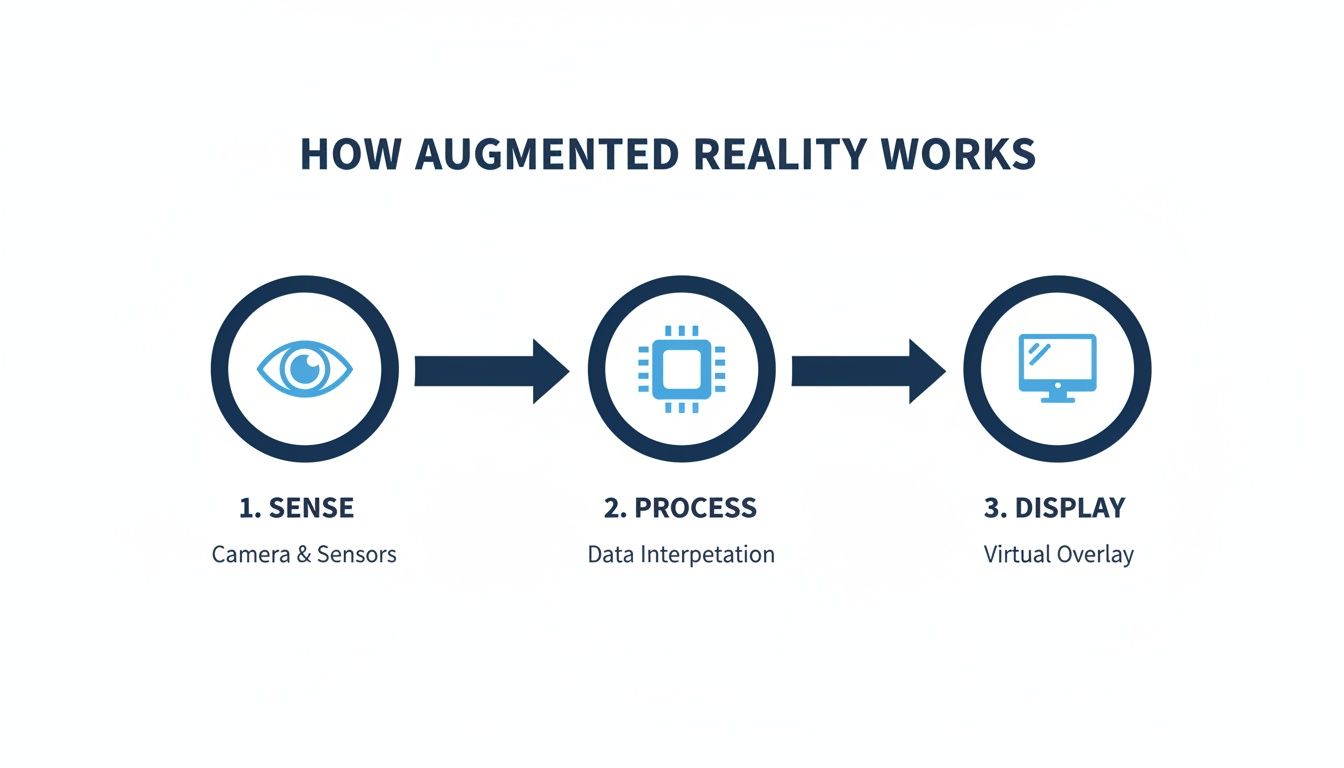
As the diagram shows, it’s a constant cycle: raw data from the environment is captured, computed, and converted into a useful digital overlay, all in the blink of an eye.
Understanding How AR Devices See the World
Before an AR device can overlay digital information onto your view, it has to first make sense of the world around it. Think about how you walk into a new room—you automatically take stock of the furniture, walls, and doorways. AR devices do the same thing, but they rely on a sophisticated set of sensors and software to build their "mental map."
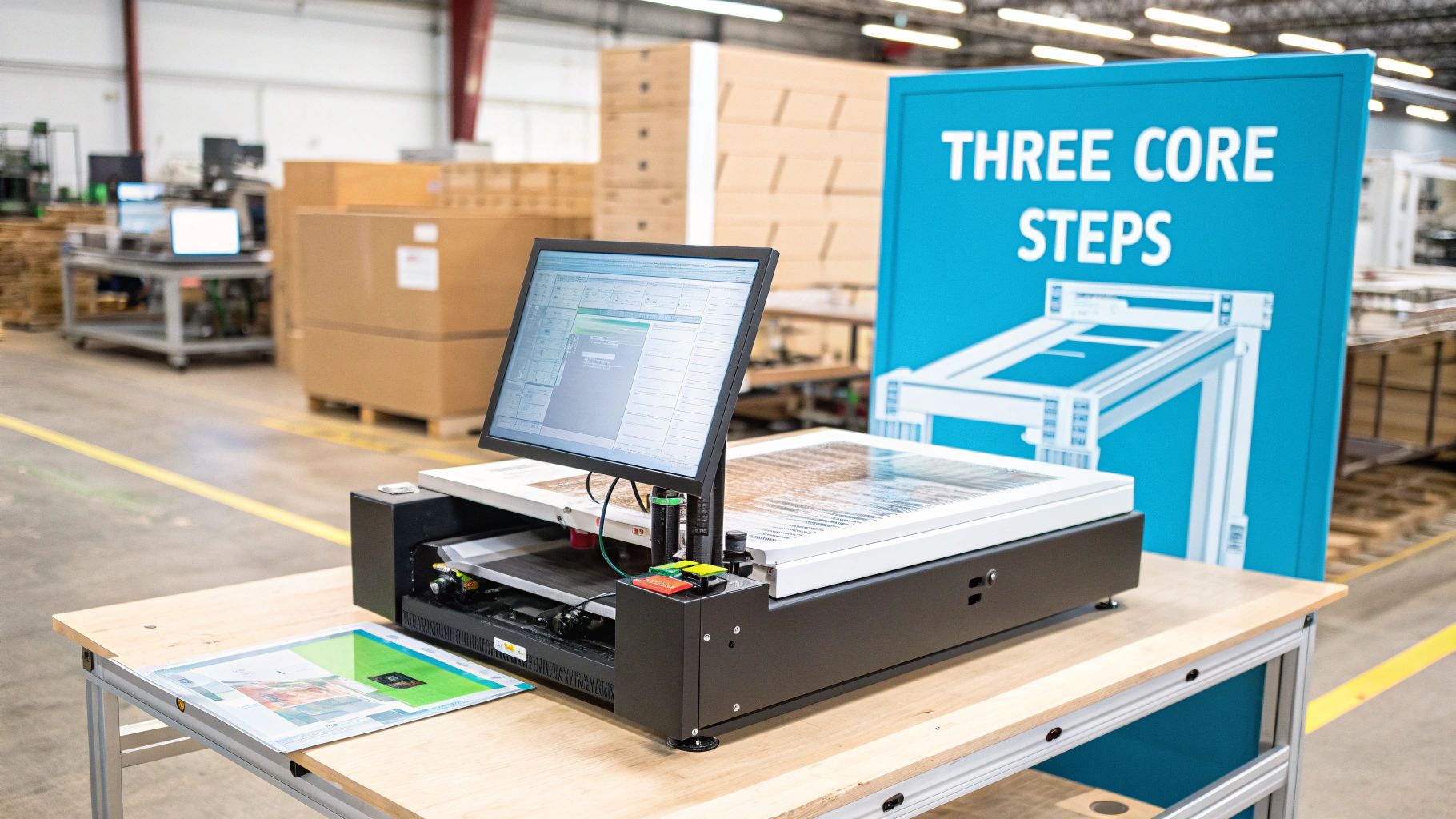
This whole process kicks off with the device's hardware sensors. These components work in concert, constantly feeding data about the physical environment to the system. This sensory input is the bedrock of any AR experience. Without it, digital overlays would just float around aimlessly instead of looking like they're anchored to real-world objects.
The Sensors That Power Perception
A few key sensors do the heavy lifting, collecting the raw data that makes augmented reality work. Each one has a distinct job, but they all contribute to the device's awareness of its surroundings and your movements.
- Cameras: These are the device's primary eyes, capturing the video feed of the real world you see on screen. They provide the visual cues needed to recognize and track objects.
- Inertial Measurement Units (IMUs): An IMU usually contains an accelerometer for tracking up-down, left-right, and forward-back motion, plus a gyroscope for tracking rotation. Together, they tell the AR system exactly how the device is moving, tilting, and turning in space.
- Depth Sensors: More advanced AR hardware, like dedicated smart glasses, often includes depth sensors like LiDAR (Light Detection and Ranging). These sensors shoot out beams of light and measure how long they take to bounce back, creating a super-precise 3D map of the environment.
The combined data from these sensors gives the device a rich, layered understanding of its own position and the geometry of the space it's in. If you want to dive deeper into the hardware, our guide on how smart glass works breaks down how these components come together.
Making Sense of the Data with SLAM
Collecting data is just step one. The real magic happens when the device has to interpret all that information in real-time to create a stable, interactive experience. This is where a crucial algorithm called Simultaneous Localization and Mapping (SLAM) comes in.
Imagine you're in a pitch-black room and need to find the door. You'd probably put your hands out, feeling the walls to build a mental map while keeping track of where you are in relation to what you've already touched. SLAM operates on a very similar principle.
SLAM is the computational process that allows an AR device to build a 3D map of an unknown environment while simultaneously keeping track of its own location within that map.
This dual process is what makes "markerless" AR possible, allowing you to place digital objects on any surface—a floor, a table, a piece of machinery—and have them stay put as you move around. The system finds unique features in the environment, remembers where they are, and uses them as anchors for the virtual content.
From Mapping to True Scene Understanding
Just mapping out geometry isn't enough anymore. Modern AR systems are pushing toward true scene understanding, which is the ability to not only see surfaces but to identify what they are. For instance, the system doesn't just see a flat horizontal plane; it recognizes it as a "floor." It sees a vertical surface and knows it's a "wall."
This kind of semantic understanding is a massive leap forward for industrial uses. It means an AR system can be programmed to automatically place safety warnings on the factory floor, project assembly instructions directly onto a specific machine part, or show maintenance data right next to the correct control panel.
To really get how AR devices see their world, you have to appreciate the role of advanced data collection. A solid reality capture workflow is the foundation for turning physical spaces into the digital data that AR systems feed on. By accurately recognizing and categorizing objects, the device can deliver information that’s genuinely useful, making AR a powerful tool for boosting both efficiency and safety.
Bringing Digital Overlays to Life with Real-Time Rendering
Once an AR system understands its surroundings, the real magic begins: making digital content look like it's actually part of your world. This is all thanks to real-time rendering, the process that generates and projects digital overlays—3D models, text, or animations—into your line of sight with the perfect perspective, scale, and lighting.
Think of it as creating movie-level special effects, but it’s happening on the fly, just for you. The AR device is constantly calculating where to place digital objects so they seem like they truly belong there. For this illusion to hold up, the rendering has to be incredibly fast and fluid.
The Need for Speed in Industrial AR
In settings like a factory floor or a remote field site, a smooth visual experience isn’t just a nice-to-have. It’s a non-negotiable for safety and accuracy. The industry benchmark for high-performance AR is 60 frames per second (FPS) or higher. Anything less causes noticeable lag or jitter that can lead to costly mistakes, or even accidents.
Imagine a remote expert guiding a new technician through a complex repair. If the digital arrow pointing to a specific valve lags behind the technician's head movement, it could end up pointing at the wrong component entirely. A high frame rate keeps the digital overlay perfectly locked to the real world, providing clear, reliable guidance when it matters most.
This high-speed rendering is computationally intensive, demanding powerful GPUs to process massive streams of sensor data and generate graphics in an instant. This is where AR truly proves its worth. In manufacturing, virtual training that lets workers interact with holographic machinery can lead to 75% faster learning curves and drastically reduce material waste. It’s practical benefits like these that are driving the global AR market, which was valued at USD 83.65 billion and is projected to hit USD 599.59 billion.
How AR Anchors Digital Content
To make digital objects look convincing, AR systems need a reference point—an anchor—in the real world. There are two main ways to do this, and each has its own strengths, especially for business applications. This is a core part of how augmented reality works; it’s how the system knows when and where to "trigger" the digital content.
One of the most exciting developments in this space is combining these rendering techniques with artificial intelligence. You can dive deeper into this synergy in our article on how AI revolutionized and accelerated AR technologies.
Marker-Based AR
This approach uses a predefined visual trigger, or "marker," to position digital content. The most common example is a QR code on a piece of equipment. When the AR device’s camera sees the marker, it knows exactly where to place the corresponding 3D model or set of instructions.
- Pros: It’s incredibly reliable and precise. This makes it perfect for applications where accuracy is everything, like assembly guidance or maintenance checklists.
- Cons: It requires a physical marker to be stuck on the object, which isn't always practical. The experience is limited to only where you can place a marker.
Markerless AR
Markerless AR is a bit more sophisticated. Instead of looking for a specific marker, it uses the SLAM technology we talked about earlier to identify unique features in the environment—like the corner of a table or the texture of a wall—and uses those as anchor points.
This method gives you the freedom to place digital content anywhere you want, without needing a pre-printed tag. It’s what lets you preview a new piece of industrial machinery right on your factory floor just by pointing your device.
- Pros: It offers amazing flexibility and feels much more natural to the user, since it works in almost any environment.
- Cons: It can be less precise than marker-based AR. Things like poor lighting can sometimes throw off its ability to track features accurately.
Choosing the Right Hardware and Software for Your Needs
A powerful augmented reality experience is only as good as the tools behind it. Knowing how augmented reality works on a technical level is one thing, but turning that knowledge into a real business solution means picking the right blend of hardware, software, and deployment models. The AR world is packed with options, from the smartphone in your pocket to highly specialized gear built for the factory floor.
The right choice always starts with what you’re trying to accomplish. Are you looking to get new hires up to speed faster? Streamline a tricky maintenance procedure? Give your field technicians instant expert backup? Each goal puts different demands on the tech, influencing everything from the device someone wears to how your data is managed and kept secure.
Selecting the Ideal AR Hardware
Hardware is the bridge between your team and the digital information they need to see. The device you choose has a direct impact on comfort, mobility, and whether the AR application is actually helpful or just a gimmick.
The market for AR hardware is massive, expected to make up a 40% share of the total AR market. This growth isn't just about flashy new gadgets; it’s about devices that use sophisticated depth sensors and AI to seamlessly blend virtual objects with the real world, making the experience feel natural. As you can discover in more detail from AR market trend reports, specialized training simulations built on this tech are already quadrupling training throughput in some industries.
Most industrial AR hardware falls into one of these buckets:
- Smartphones and Tablets: The most accessible AR tools, since nearly everyone already has one. They're great for quick, simple tasks, but they have one major drawback: you have to hold them. That’s a non-starter for hands-on industrial work.
- Smart Glasses: These are designed for real work. Devices like the Microsoft HoloLens or Vuzix Blades are lightweight enough for all-day wear and project information directly into a user’s line of sight. This makes them perfect for remote assistance or displaying step-by-step instructions while keeping a technician's hands free.
- Dedicated AR Headsets: Think of these as the heavy-duty option. They are built for total immersion, often with wider fields of view and more powerful sensors. You’ll typically see them used for deep-dive training simulations or complex design reviews where feeling fully present in the digital model is key.
Choosing the right device is a balancing act. A powerful headset might offer the most stunning visuals, but for a technician on an eight-hour shift, a pair of lightweight smart glasses is a far more practical tool.
To help you decide, here’s a quick breakdown of how these devices stack up for different industrial jobs.
Comparison of AR Hardware for Industrial Use
This table compares the most common types of AR devices, helping businesses select the best hardware for their specific operational needs, from training to field service.
| Device Type | Key Strengths | Common Limitations | Ideal Use Cases (e.g., Training, Remote Support) |
|---|---|---|---|
| Smartphones/Tablets | Low cost, widespread availability, easy to deploy. | Not hands-free, smaller screen size, limited immersion. | Quick reference guides, simple inspections, customer-facing demos. |
| Smart Glasses | Hands-free operation, lightweight for extended use, contextual information display. | Narrower field of view, limited processing power compared to headsets. | Remote assistance, guided work instructions, real-time data visualization, quality control. |
| Dedicated AR Headsets | Highly immersive, wide field of view, advanced tracking and sensors. | Can be bulky and heavy, higher cost, may require more setup. | Complex training simulations, 3D design visualization, virtual prototyping. |
As you can see, the "best" device really depends on the job at hand. A field service tech benefits most from the hands-free convenience of smart glasses, while an engineer reviewing a new product design needs the immersive power of a full headset.
The Software That Powers the Experience
Behind every AR device is a software stack that brings the experience to life. This isn't just a single app but a whole toolkit that handles everything from creating the 3D models to connecting with your existing company systems.
- Software Development Kits (SDKs): These are the fundamental building blocks. Developers use SDKs to build AR applications from the ground up, giving them the core tools for things like object tracking and rendering digital content.
- Content Management Systems (CMS): An AR-specific CMS is a game-changer because it puts content creation in the hands of your subject matter experts. A senior training manager, for example, could build a new interactive workflow without ever touching a line of code.
- Enterprise AR Platforms: These are the all-in-one packages. They bundle the SDK, CMS, and integration tools into a complete solution designed to solve a specific business problem, like remote service or skills training. They typically come with all the necessary features for managing users, tracking analytics, and ensuring enterprise-grade security.
Deciding on a Deployment Model
The final piece of the puzzle is figuring out how this new solution will fit into your existing IT world. This choice impacts security, scalability, and the total cost over the long run.
There are really only two roads to go down:
- SaaS (Software-as-a-Service): This is the cloud-based route. The software is hosted by the provider, and you access it through a subscription. The big wins here are lower upfront costs, automatic updates, and the ability to scale up or down easily.
- On-Premise: With this model, you install and run everything on your own company servers. It gives you absolute control over your data and security, which is often a non-negotiable for companies in heavily regulated industries.
So, which is right for you? A global company with a strict data policy might lean toward an on-premise solution for total control. A smaller business, on the other hand, will likely find a SaaS model far more cost-effective and manageable. Understanding these hardware, software, and deployment options is the key to building an AR solution that actually delivers real, measurable results.
Putting AR to Work with Real-World Industrial Applications
Knowing the theory behind AR—the sensors, the rendering, the hardware—is one thing. But seeing how it solves real, expensive business problems? That’s where the value truly clicks into place. Moving from the abstract to the factory floor, AR excels in industrial settings by making complex jobs simpler, safer, and far more efficient.
This is where all the technical pieces we've discussed, like SLAM and real-time rendering, translate directly into measurable gains. Think reduced machine downtime, faster training, and fewer costly mistakes. Let's look at two powerful examples of how this actually works.
Accelerating Skills with Virtual Training
Imagine bringing a new technician up to speed on a complex piece of machinery. The old way involves shadowing a veteran, poring over thick manuals, and hoping they don’t make a critical mistake on a live production line. It's slow, risky, and expensive.
AR flips that entire model on its head.
With an AR headset, a trainee can see a full-scale, interactive 3D model of the machine right there in the training room. The system walks them through every procedure step-by-step, overlaying digital instructions and animations directly onto the virtual equipment.
- Hands-On Practice: They can "push" virtual buttons, "turn" digital dials, and watch the simulated machine react instantly.
- Safe Environment: Trainees can practice emergency shutdown sequences or diagnose common faults without any danger to themselves or the actual equipment.
- Performance Tracking: The software can track their progress, pinpoint areas where they're struggling, and offer immediate feedback to lock in the learning.
This approach has been shown to accelerate skill acquisition by up to 75%. By creating a safe, repeatable, and engaging learning space, companies can get new hires productive faster and ensure they’re confident before they ever touch the real thing. For a broader look at how companies are using this, check out these diverse Augmented Reality marketing examples.
Transforming Field Service with Remote Support
Now, let's picture a different scenario. A field technician is at a remote site, staring down a critical equipment failure. The machine is unfamiliar, and the only expert who knows it inside and out is hundreds of miles away. Every minute that machine is down, money is being lost.
Using AR-powered remote support, the field tech simply puts on a pair of smart glasses and dials up the expert.
The expert sees exactly what the technician sees, as if they were standing right there. This shared first-person perspective is a game-changer for troubleshooting complex issues from a distance.
From their office, the remote expert can use AR to guide the repair with absolute clarity. They can draw digital arrows onto the technician's view, circle the exact component to check, or even drop 3D diagrams right onto the physical equipment. With their hands totally free, the on-site tech just follows the visual cues to get the job done right the first time.
This method can cut service resolution times in half and nearly eliminate the need for expensive expert travel. The business saves a fortune on travel costs, slashes equipment downtime, and makes its top talent available to support the entire team, no matter where they are. To see how far-reaching these solutions are, you can read about other augmented reality industrial applications driving similar bottom-line results.
Your Step-by-Step Enterprise AR Implementation Plan
Getting augmented reality right isn't about buying the flashiest new gadget. It’s about having a rock-solid, strategic plan that ties the technology directly to real business results. This roadmap breaks the journey down into simple, manageable phases, giving operational leaders everything they need to build a strong case, run a smart pilot, and make sure AR truly delivers.
The first step is always to look inward. Before you even think about hardware or software, you have to get crystal clear on what business problem you’re actually trying to solve. Without a specific goal, even the most impressive technology is just an expensive science project.
Phase 1: Define Your Objectives
Start by zeroing in on your biggest operational headaches. Are you bleeding money on high training costs for new hires? Struggling with long machine downtimes? Plagued by repeat errors in complex assembly jobs? You need to pinpoint a specific, measurable goal.
For instance, a weak objective is "improve training." A powerful one is "reduce new technician onboarding time by 30%" or "cut average equipment repair time by 25%." These concrete targets will steer every decision you make and give you the hard numbers to prove the project’s value down the line.
A well-defined objective is your project's north star. It keeps your AR implementation focused on a real-world problem and creates a clear benchmark for measuring success and calculating your return on investment.
Phase 2: Plan Your Pilot Program
Jumping into a full-scale rollout is a recipe for disaster. Instead, pick a single, high-impact use case for a pilot program. This focused trial lets you test the tech, get feedback from your team, and measure results in a controlled, low-risk setting.
Your pilot needs a few key things:
- A defined scope: Stick to one workflow, like a single machine repair procedure or one specific training module. Don't try to boil the ocean.
- A select user group: Grab a small crew of end-users who are open to new technology and will give you honest, constructive feedback.
- Clear success metrics: Track the KPIs you set back in phase one. This is where you prove the concept with data, whether it's time saved or errors eliminated.
This approach minimizes risk while building serious momentum. Nothing convinces senior leadership to greenlight a wider implementation like a successful pilot with a documented ROI.
Phase 3: Select Tools and Integrate
Once you have a clear use case, you can finally start picking the right tools for the job. Select hardware—whether it’s smart glasses or tablets—that actually fits the physical demands of the work. At the same time, look at enterprise AR platforms that can plug into the systems you already use, like your Learning Management System (LMS) or Computerized Maintenance Management System (CMMS).
Integration is everything. AR should feel like a natural extension of your team’s existing workflow, not some clunky, standalone app they have to fight with. This last step ensures the technology works for your people, not the other way around.
Common Questions We Hear About AR
As companies start exploring what augmented reality can do for them, a few key questions always come up. Let's tackle them head-on and clear up some of the common uncertainties around how this technology works in the real world.
What’s the Real Difference Between AR and VR?
The simplest way to think about it is that Augmented Reality (AR) adds to your world, while Virtual Reality (VR) replaces it.
With AR, you're still grounded in your physical surroundings. Digital information—like repair instructions or a 3D diagram—is layered on top of a real piece of equipment you’re looking at. You’re still present and fully aware of what’s around you.
VR, on the other hand, is a total immersion. Once you put on a headset, your physical world disappears and you’re transported into a completely simulated digital environment.
It all comes down to presence. AR keeps you present in your physical space, just with a digital overlay. VR takes you somewhere else entirely.
This distinction is exactly why AR is so powerful for on-the-job tasks where seeing the real world is non-negotiable.
How Does AR Actually Connect to Our Existing Software?
This is a big one, and the good news is that enterprise-grade AR platforms are built specifically to play nice with the systems you already rely on. The goal is a smooth, connected workflow, not another isolated piece of tech.
The magic behind this is a set of Application Programming Interfaces (APIs), which are basically secure communication channels that let different software talk to each other and share data.
Some of the most common integrations we see are:
- Learning Management Systems (LMS): Syncing AR training modules with your LMS lets you automatically track who completed what, when, and how well they performed.
- Computerized Maintenance Management Systems (CMMS): Imagine a technician pulling up a machine’s entire service history, open work orders, and technical drawings just by looking at it. That’s AR connected to a CMMS.
- Enterprise Resource Planning (ERP) Systems: This bridges the gap between high-level operational data and the hands-on work happening on the factory floor.
What Are the Biggest Hurdles in an Industrial AR Rollout?
Getting AR up and running in a tough industrial setting isn't without its challenges, but they are absolutely manageable with the right plan.
First, you need hardware that can take a beating. Consumer-grade devices just won't cut it. Then there’s connectivity—you need a reliable network, which can be tricky in sprawling plants or remote field sites with spotty Wi-Fi.
Data security is, of course, a huge priority. But arguably the most critical piece is getting your team on board. You can have the best tech in the world, but it’s useless if no one wants to use it. A solid change management strategy is key.
That's why we always recommend starting with a well-planned pilot program. It's the best way to prove the technology's value, work out any kinks on a small scale, and build excitement before you go all-in.
Ready to see how AR can solve your operational challenges? AIDAR Solutions provides expert guidance and powerful tools to integrate augmented reality into your training and service workflows, delivering measurable results. Learn more about our solutions.